A corporate event can have an excellent speaker, a strong message, and an impressive venue. It can still fall flat if the technology does not support the experience. Professional av production brings together audio, video, lighting, staging, presentations, cameras, streaming, and technical support so every part of the event works as one system. The right production approach helps attendees hear the message, see the content, and stay focused on the program instead of technical distractions.
What Does AV Production Include?
AV production covers much more than microphones and projectors.
It involves the technical systems used to create, display, amplify, record, and broadcast an event.
A corporate production might include:
- Wireless microphones
- Speakers and amplifiers
- Mixing consoles
- Projectors
- LED video walls
- Presentation screens
- Cameras
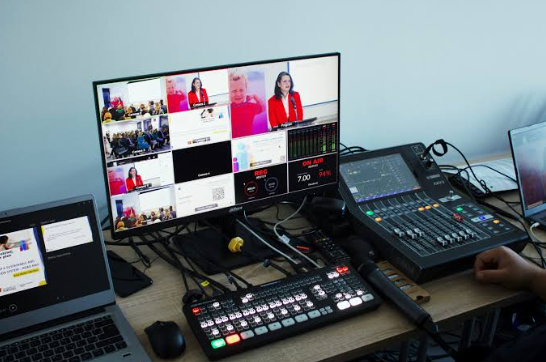
- Video switchers
- Confidence monitors
- Stage lighting
- Playback systems
- Streaming equipment
- Digital signage
- Staging
- Technical control systems
The production team also manages the people operating that equipment.
Equipment is only one part of the production. The technical crew is what makes the equipment useful.
A microphone needs someone to test it.
A presentation needs someone to cue it.
A camera needs someone to frame the shot.
A livestream needs someone to monitor the signal.
A stage needs someone to coordinate the technical cues.
That coordination becomes especially important as an event gets larger.
See also: Island Life, British Finds: Curating Hard-to-Get Favourites from Afar
Start With the Event’s Purpose
Every event needs a clear technical strategy.
A sales kickoff may need energetic walk-on music, dynamic graphics, large screens, and multiple presenters.
A leadership town hall may prioritize clear speech, audience questions, and reliable video conferencing.
A product launch may depend on dramatic lighting, high-resolution product footage, and carefully timed reveals.
A training event may need several breakout rooms with consistent presentation systems.
The event objective should determine the production design.
Do not start by asking, “How many speakers do we need?”
Start with:
What does the audience need to see?
What does the audience need to hear?
What needs to happen on stage?
Will people watch remotely?
How many presenters are involved?
What content needs to be displayed?
The answers create the foundation for the technical plan.
Build a Detailed Production Schedule
A production schedule should include more than speaker names and presentation times.
It should show the technical requirements for every part of the program.
For example:
8:55 AM — Opening music
9:00 AM — Animated event graphics
9:02 AM — CEO walk-on
9:03 AM — CEO microphone live
9:10 AM — Presentation slides on screen
9:25 AM — Product video
9:28 AM — Camera returns to CEO
9:40 AM — Panel introduction
9:42 AM — Four microphones live
This information gives the production crew a clear roadmap.
It also reduces confusion between the event planner, stage manager, presenters, and technical operators.
A strong show flow tells the crew what should happen, when it should happen, and what equipment needs to be ready.
Audio Is the Foundation
People will forgive a simple stage.
They are much less forgiving when they cannot hear the speaker.
Poor audio can make an otherwise professional event feel disorganized.
The production team needs to select microphones based on how speakers move and present.
A presenter standing behind a podium may use a podium microphone.
A speaker walking around the stage may need a wireless lavalier or headset.
A panel may require a microphone for each participant.
Audience questions may require roaming handheld microphones.
Each setup has different requirements.
The audio team also needs to consider the room.
A ballroom with high ceilings can behave differently from a smaller conference room. Hard surfaces can create reflections. Room geometry can affect coverage.
The goal is consistent, intelligible audio across the audience area.
That means attendees in the front row and attendees near the back should both be able to follow the speaker.
Plan for Microphone Backups
A microphone failure should not interrupt a keynote.
Professional production planning includes backup options.
Keep spare microphones available.
Check batteries before the program.
Test every wireless frequency.
Confirm that the receiver is positioned correctly.
Label microphones if several presenters are involved.
Have technicians monitor the audio throughout the program.
These steps seem simple.
They matter.
A two-minute microphone problem can feel much longer when thousands of people are waiting for a speaker to continue.
Make Video Work for the Audience
Video can communicate information quickly.
A product demonstration can show details that would be difficult to explain verbally.
A live camera feed can help people see a speaker’s facial expressions from the back of a large room.
A video wall can create a branded stage environment.
A presentation screen can keep important information visible while the speaker talks.
The challenge is making sure the video system fits the venue.
Consider the size of the room.
Consider the screen dimensions.
Consider viewing distance.
Consider the type of content.
A detailed financial chart requires different visual treatment from a short promotional video.
The screen should be large enough and positioned correctly so the audience can actually use the information being displayed.
Use Cameras With a Purpose
Adding cameras does not automatically improve an event.
Each camera should have a job.
One camera might capture a wide shot of the stage.
Another might provide a close-up of the presenter.
A third might focus on a product demonstration.
Another camera could capture a panel.
The production director can then switch between those shots.
This creates a more engaging experience for remote viewers.
It also gives the in-room audience additional visual options when the event uses large displays.
Camera placement should be planned around the program, not simply around where it is convenient to put a tripod.
Consider sightlines.
Consider lighting.
Consider speaker movement.
Consider the position of presentation screens.
Consider the audience.
Lighting Changes the Look of the Stage
Lighting does more than make a stage brighter.
It affects the mood and visual identity of the event.
A corporate conference might use clean, even lighting for speakers.
A product launch could use more dramatic lighting during a reveal.
A sales kickoff might use movement and color changes between sessions.
A panel discussion needs consistent lighting across all participants.
The lighting system should also work with the cameras.
A stage can look bright to people in the room but still appear dark or uneven on camera.
The production team should test lighting through the actual camera system before the event begins.
Coordinate Lighting With Other Cues
Lighting should be part of the show flow.
For example:
The room dims.
Opening graphics appear.
Music begins.
Stage lights come up.
The presenter walks on.
The microphone opens.
The presentation appears.
Each cue should happen at the correct moment.
A show caller or production director can coordinate these transitions.
Small technical details create a smoother audience experience.
Attendees may never notice the individual cues.
That is the point.
The transitions should feel natural.
Design the Stage Around the Content
Stage design should support what happens on stage.
A speaker needs space to move.
A panel needs comfortable seating.
A product demonstration needs a clear working area.
A large presentation needs a screen that does not compete with the presenter.
A camera needs a clean shot.
Branding needs to be visible without overwhelming the content.
Every stage element should have a reason for being there.
This includes set pieces, screens, furniture, lighting fixtures, signage, and decorative elements.
Good design combines appearance with function.
Don’t Forget Confidence Monitors
Presenters often need to see information that the audience sees.
Confidence monitors can display:
- Presentation slides
- Speaker notes
- Countdown timers
- Video feeds
- Stage cues
- Program information
This prevents presenters from constantly turning toward the main screen.
It also helps them maintain eye contact with the audience.
A confidence monitor is especially useful for keynote speakers, executives, panels, and teleprompter-style presentations.
Presenter visibility can make a noticeable difference in delivery.
Prepare Presentations Before Event Day
Do not wait until the speaker walks on stage to open their presentation.
Collect presentation files ahead of time.
Check the aspect ratio.
Play every embedded video.
Test animations.
Check fonts.
Review transitions.
Verify audio.
Look for missing media.
Confirm that the presentation opens correctly on the production computer.
This is especially important when multiple presenters are involved.
A speaker may create their deck on a different computer.
They may use fonts that are not installed on the event system.
They may embed a video that depends on an internet connection.
A presentation file should be treated as part of the technical production, not just an attachment from the speaker.
Build a Backup Presentation System
A backup computer can prevent a small software problem from becoming a major interruption.
Keep a duplicate copy of important presentations.
Store video files separately.
Maintain a clear naming system.
For example:
01_Opening_Video.mp4
02_CEO_Presentation.pptx
03_Product_Demo.mp4
04_Panel_Slides.pptx
This simple organization makes it easier for operators to locate the correct file quickly.
Hybrid Events Need a Separate Plan
A hybrid event has two audiences.
The people in the room experience the live event.
Remote attendees experience a broadcast.
The production needs to serve both.
Remote viewers should hear the speaker clearly.
They should see the presentation.
They should see the presenter when appropriate.
They should be able to follow audience questions.
The stream should remain stable.
A hybrid event should be designed as a complete viewing experience, not treated as an afterthought.
The production team may need dedicated cameras, encoders, streaming operators, remote speaker feeds, graphics, and additional audio routing.
Test the Internet Connection
Streaming requires a reliable network.
Do not assume that venue Wi-Fi is sufficient.
Ask about dedicated bandwidth.
Confirm upload speeds.
Test the connection before event day.
Check whether other vendors will share the network.
Identify backup options.
A livestream can look perfect during a short test and still encounter problems during the event if the network becomes congested.
Network planning should be part of the production plan from the beginning.
Plan for Technical Failures
Every live event has some level of risk.
The goal is to reduce the impact.
Create backup plans for important systems.
That can include:
- Spare microphones
- Backup playback computers
- Duplicate presentation files
- Extra cables
- Spare batteries
- Backup signal paths
- Redundant streaming equipment
- Additional adapters
- Backup internet options
The production team should also know how to respond.
A backup plan only works if someone knows when to activate it.
Catalyst describes conducting pre-event checks and keeping backup equipment available for technical problems.
Bring the Production Team in Early
AV decisions can affect almost every part of an event.
The production team may need to coordinate with:
- Venue management
- Event planners
- Speakers
- Designers
- Marketing teams
- IT teams
- Streaming providers
- Staging vendors
- Lighting teams
- Exhibitors
Early communication gives everyone time to identify potential conflicts.
For example, a stage designer may need to know where LED panels will be installed.
The IT team may need to reserve dedicated internet capacity.
The speaker team may need to collect presentations.
The venue may need to approve rigging plans.
Early AV involvement prevents technical requirements from becoming last-minute problems.
Catalyst says it works with clients from the initial planning stages so the AV strategy can be integrated with the broader event plan.
Match the Crew to the Event
A small meeting may only require one technician.
A large conference can require an entire production team.
The crew could include:
- Audio technicians
- Video technicians
- Lighting technicians
- Camera operators
- Streaming operators
- Stage managers
- Show callers
- Production managers
- Technical directors
The size of the crew should reflect the complexity of the program.
More equipment does not automatically mean better production. The right people operating the right systems is what keeps the event moving.
Think About Multi-City Events
Some organizations run events in several cities.
That creates another challenge.
The technical experience should remain consistent.
The stage design may need to adapt to different venues.
The production equipment may need to travel.
Local venue requirements can vary.
The event team needs a repeatable process.
Catalyst states that it works on multi-state shows and has produced events in more than 17 countries.
A traveling production partner can help organizations maintain consistent technical standards across locations.
Measure the Production by the Audience Experience
The audience does not care how many cables are behind the stage.
They care whether they can hear the speaker.
They care whether they can see the presentation.
They care whether the video works.
They care whether transitions feel smooth.
They care whether the event keeps moving.
That is why successful AV production should feel almost invisible to the attendee.
The technology is present.
The audience simply does not have to think about it.
They can focus on the speaker.
They can understand the presentation.
They can participate in the event.
Final Thoughts
AV production is one of the systems that connects an event together.
Audio carries the message.
Video delivers information.
Lighting shapes the environment.
Cameras extend the experience.
Streaming connects remote attendees.
Staging creates the physical framework.
Technical operators coordinate everything.
The strongest production plans begin long before the audience enters the room.
Start with the event goal.
Map the attendee experience.
Review the venue.
Plan the stage.
Collect presentations early.
Test microphones.
Check cameras.
Build the cue sheet.
Test the livestream.
Prepare backups.
Assign the right technical crew.
Then rehearse the important moments.
The result is a corporate event where technology supports the message instead of distracting from it. That is the real value of thoughtful AV production: creating a reliable, clear, and engaging experience from the first cue to the final presentation.